
AI in Every Corner of the IT Landscape

Welcome to this week's Dunetrails newsletter! Once again we bring you up to speed on the most important developments around Microsoft 365 and security. Microsoft Ignite 2025 yielded quite a bit of news. We take a deeper dive into Agent 365, the brand-new control tool for managing AI agents in your organisation. We also look at Security Copilot: Microsoft's AI security assistant that is now included in E5 packages (with 400 SCU per 1000 licences, what does that mean?). We also introduce you to 12 new Microsoft Security Agents that simplify IT and security tasks. Finally we cover passkey profiles and synced passkeys, a step towards a passwordless future.
Read on for all the insights. And good news: from this week our newsletter is also available as audio on Spotify, so you can easily listen to it on the go!
Agent 365: control over all your AI agents
One of the biggest announcements at Ignite was Agent 365, a new management platform for AI agents. But what exactly are those "AI agents"? Think of small smart helpers (AI tools) that can automatically carry out tasks for you in Microsoft 365, Azure or Windows. For example an agent that categorises emails, drafts a report or investigates security incidents. Sounds handy, but in an organisation you want to keep control over what these agents do and which data they see.
Agent 365 is therefore set up as a "control plane" for all those AI agents in your company. Microsoft gives every AI agent its own Entra ID (comparable to how every user has an account). This lets you as IT admin keep track of exactly which agents are active, what they do and what they have access to. In the Microsoft 365 admin console you get a central overview of all AI agents in the organisation, regardless of whether they were built via Copilot Studio, Azure AI or elsewhere.
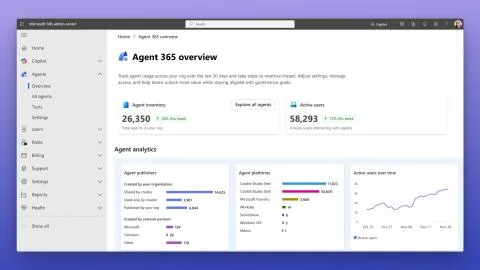
Without central management, employees or developers could switch on AI agents haphazardly, with potentially unmanaged access to company data. Agent 365 therefore lets you:
- Visibility: see all active agents and their activities in one dashboard. No more hidden "shadow AI"; even third-party or open-source agents are included in the overview.
- Manage identity & access: because every agent has an Entra ID identity, you can apply policies to them just as with users. For example setting rights templates so an agent can only reach the strictly necessary data (least privilege).
- Insight and compliance: Agent 365 logs agent actions for audits and compliance. You can run reports and even measure the ROI of an agent.
WorkIQ: AI that makes your work(place) smarter
Beside the tools for the IT department, there was also news at Ignite for end users themselves. WorkIQ is a new concept within Microsoft 365 Copilot that is meant to make your working day more productive and simpler. But what exactly is WorkIQ?
You can see WorkIQ as the "intelligence" behind the scenes of Copilot and your Microsoft 365 apps. The system analyses two things:
- Your organisation data (for example calendars, documents, workflows)
- A kind of "memory" of how you use AI tools and which preferences you have.
By combining those two, WorkIQ tries to proactively understand what you need during your work. In practice this means the AI can for example predict which step logically follows in your current task, or which tool (agent) best fits what you are trying to do.
Security Copilot now included in E5 (with 400 SCU per 1000 licences)
At Ignite Microsoft announced that Security Copilot will be available at no extra cost for all customers with a Microsoft 365 E5 subscription, within their trusted security tools. This is big news, because previously Security Copilot was a separate (paid) product. Now it simply becomes an advantage of E5.
What does "400 SCU per 1000 licences" mean?
One specific figure stood out in this announcement: "400 SCUs included per 1000 licences, up to 10,000 SCUs per month". This needs some explanation:
- SCU stands for Security Compute Unit. You can see it as a unit of measurement for how much AI processing power or capacity you use in Security Copilot. Every time you have Copilot do a task (a prompt, analysis, agent action, and so on), that "costs" a certain number of SCUs, depending on how heavy that task is.
- 400 SCU per 1000 users comes down to 0.4 SCU per user. Do you have fewer than 1000 E5 users? Then you get SCUs pro rata too. For example, an SME with 100 E5 licences would get 40 SCU per month included. With 250 licences you get 100 SCU per month, and so on (it scales linearly).
- This credit is monthly and resets every month (not saved up if you do not use it).
Now, what can you do with those SCUs? Microsoft indicates that 400 SCU per 1000 users is sufficient for "typical scenarios". A concrete example: an organisation with 4000 E5 users gets 1600 SCU per month included. With that, security teams can that month for example run dozens of AI analyses, have alerts summarised, generate reports and so on, without additional costs. If they exceed those 1600 SCUs, Copilot output is temporarily capped or you have to buy extra capacity. But again, the estimate is that for a normal workload the included SCUs are amply sufficient.
The value of this is considerable. Previously, as a customer you had to purchase Security Copilot capacity (at $4 per SCU per hour provisioned), which could run into tens of thousands of dollars per year for a larger organisation. Now you get that as a bonus with E5. For SMEs with E5 it is above all nice that you can experiment and benefit from the AI features in Security Copilot without an extra invoice.
A dozen new Security Agents
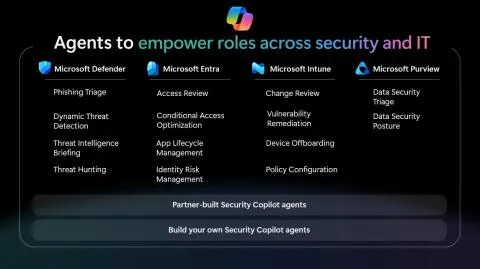
In the wake of Security Copilot, Microsoft announced 12 brand-new AI "agents" at Ignite that are integrated into the security suite (Defender, Entra, Intune, Purview). These agents are designed to take over or simplify targeted tasks from security and IT teams. Here we discuss the four most striking agents in detail.
Four most important new agents highlighted:
- Dynamic Threat Detection Agent: instead of static rules or loose signals, this agent uses continuous AI analysis to discover patterns in security incidents. It looks across all security tools (including connected third parties via Sentinel) to find gaps in your coverage and sniff out new threats. Where a traditional system perhaps only sounds the alarm on pre-set conditions, this agent proactively looks for suspicious connections that would otherwise go unnoticed. This means data from for example your AWS cloud or external log sources is included in the threat analysis. For your organisation this little agent can act as a 24/7 sleuth that keeps learning and thus detects attacks as early as possible.
- Threat Hunting Agent: this agent redefines the process of threat hunting (actively searching for signs of a break-in or malware that have not yet appeared as an alert). Normally threat hunting requires a lot of human expertise: analysts must write complex queries and dig through enormous amounts of log data. The Threat Hunting Agent removes that threshold by supporting natural language. An analyst can soon literally type: "Search the logs for suspicious PowerShell activity in the last 48 hours" and the agent carries out the deep dive. It adds contextual insights, for example correlations between a PC with odd PowerShell scripts and a known malware pattern. This makes advanced threat hunting more accessible for smaller teams or less experienced admins, because the AI does the heavy lifting and serves the results on a platter.
- Identity Risk (Management) Agent: this agent focuses on your users and their access security. Instead of standard static notifications ("User X is suspicious"), it monitors risks per identity in real time. It detects for example when a user suddenly tries to sign in from two countries at once (impossible travel), or when there is an unusual attempt to access sensitive data. The agent then guides the response; it can give suggestions: "Sign-in of user Y is highly suspicious. Action: password reset or block account?", which the admin can execute with one click. Moreover this agent has a kind of memory: if you mark certain alerts as false alarms time and again, it will learn that and sound the panic bell less often in those cases. The result is that your identity management becomes more proactive and yet calmer.
- Change Review Agent: when you as an IT admin make changes in your Intune endpoint management (for example rolling out a new configuration or policy), there is always some uncertainty: what exactly will this piece of policy set in motion on all devices? The Change Review Agent takes away that uncertainty. When you make a change, the agent analyses it in context: "What changes compared to existing settings? Which devices or users are affected? Are there potential conflicts with other policies?". It even checks for compliance risks: suppose you loosen a security setting, the agent warns that this may not square with your policy or that it introduces risks. You effectively get an impact analysis in human language, before you click "Deploy". This prevents a lot of trial and error, and the system becomes safer because faulty configurations are stopped in time.
Passkey profiles and synced passkeys
The last subject of today is something every end user may directly encounter: passkeys. Microsoft Entra (formerly Azure AD) announced some important improvements at Ignite around passkey profiles and synced passkeys. This is another step forward in the movement towards a passwordless world.
Quick refresher: what is a passkey?
A passkey is a passwordless sign-in method based on public key cryptography (FIDO2 standard). In human language: instead of typing a password, you enter nothing but use a device or biometrics to sign in. Think of how you open an account on your smartphone with your fingerprint or face without entering a password. That is the principle of passkeys. The security lies in the fact that there is no static password that can leak; the "key" stays on your device and what goes to the server cannot be cracked (a public key).
Microsoft Entra already supported passkeys via for example the Microsoft Authenticator app: these were device-bound passkeys. That means the key lives on one device (e.g. your phone) and cannot be copied. Super secure, because even if someone had your backup, the key only works with that specific device plus your biometrics.
What is new now?
- Passkey profiles: you can now define different policy states for passkeys per user group. Previously passkey use in Entra was quite global: it was on for everyone or off. Now you can for example set that employees must use a certain type of passkey, while partners or temporary contractors get a different policy. You can also let multiple passkey sign-in methods coexist under different "profiles". This gives organisations flexibility: you can impose stricter requirements for high-risk accounts (e.g. only device-bound passkeys) and milder ones for low risk (e.g. synced passkeys allowed, see point 2). In short, granularity has increased.
- Synced passkey support: this is a big one. Microsoft now gives the option to allow synced passkeys that are stored in the cloud of third parties, such as Apple iCloud Keychain, Google Password Manager or an app like 1Password. What does that mean? That a user can for example create a passkey for their company account on their iPhone and that passkey becomes available on all their Apple devices via iCloud. Or an Android user who can use their passkey on multiple devices via Google synchronisation.
Until now Microsoft only tolerated the safest variant (the device-bound one, which does not synchronise outside Authenticator). Now they say: we understand that users want convenience. If they pick up a new laptop or phone, they do not want to set up a new sign-in method again. Synced passkeys solve that, with a small trade-off in security (after all, it is stored with Apple/Google or a password manager). Microsoft now leaves the choice to the organisation: you can allow or block this per passkey profile.
And other relevant things this week...
Microsoft announces the end of WINS: Windows Internet Name Service (WINS) will be removed entirely from Windows Server releases after 2025. Organisations are strongly advised to migrate to modern DNS solutions now to avoid future disruptions. (Is anyone still using WINS?)
Windows 11 hotpatch problem solved: Microsoft has released an out-of-band update (KB5072753) that fixes an installation loop of the November 2025 hotpatch (KB5068966). System functionality was not affected, but the problem caused repeated installation attempts.
CrowdStrike discovers insider leak: cybersecurity company CrowdStrike has identified an internal employee who shared screenshots of internal systems with hackers. There was no system breach or customer data leak, but the incident has been handed over to the authorities.
Conclusion
With this overview you are up to date again on the recent developments around Microsoft 365 and security. In summary, we see Microsoft investing in more AI in every corner of the IT landscape.
At the same time they realise that control, security and user-friendliness remain essential; the new features are therefore designed to offer powerful capabilities together with grip for admins and users.
We advise you to start thinking within your organisation about how to deploy these innovations. Perhaps a trial with one of the new Security Copilot agents? Or a plan to gradually roll out passkeys and phase out classic passwords? Dunetrails is of course ready to advise and support you here.
Dunetrails
PS: Would you rather listen to this content on the go? Good news! From now on our newsletter is also available as audio. You find the spoken version on Spotify: ideal for your commute or lunchtime walk. Subscribe to our channel and stay informed that way too.